
Custom Emission Factor Library
Custom emission factors facilitate the use of factors that are not included in the provided datasets, such as factors from international sources or factors provided by suppliers.
Custom entries are intended to facilitate the use of emission factors that are specific to the reporting organisation or consultancy. Relying on custom emission factors to represent externally published factors because they are not yet supported by Carbon+Alt+Delete is not recommended.
Please contact us at support@carbonaltdelete.eu and we will let you know if your required data source is already on our roadmap or if we can provide an alternative solution.
Custom emission factors must represent physical emission intensities and should not be used to artificially offset induced emissions within the organizational inventory.
Custom datasets
The Emission Factor Library provides two connected datasets that can be populated with custom emission factors.

Shared Custom dataset
- This is available for use in all company accounts in the consultancy
- Only Admin users can create and edit the shared dataset
Private Custom dataset
- This is available for use in one specific company account
- Any user with access to the company account (other than read-only Reviewers) can create and edit the private dataset
- Custom Emission Factors created during import will be saved in the private dataset

Once populated, these datasets are used exactly the same way that other connected datasets are used.
Defining custom emission factors
In the Emission Factor Library, you will find the two custom datasets - one for the consultancy and one for the active company account.
New factors can be created by selecting "Add" at the bottom of the table. As with a standard emission factor, each has a keyword, detail, and description to help identify the required factor when searching. The unit is also selected from a list of standard units (or a custom one is created).
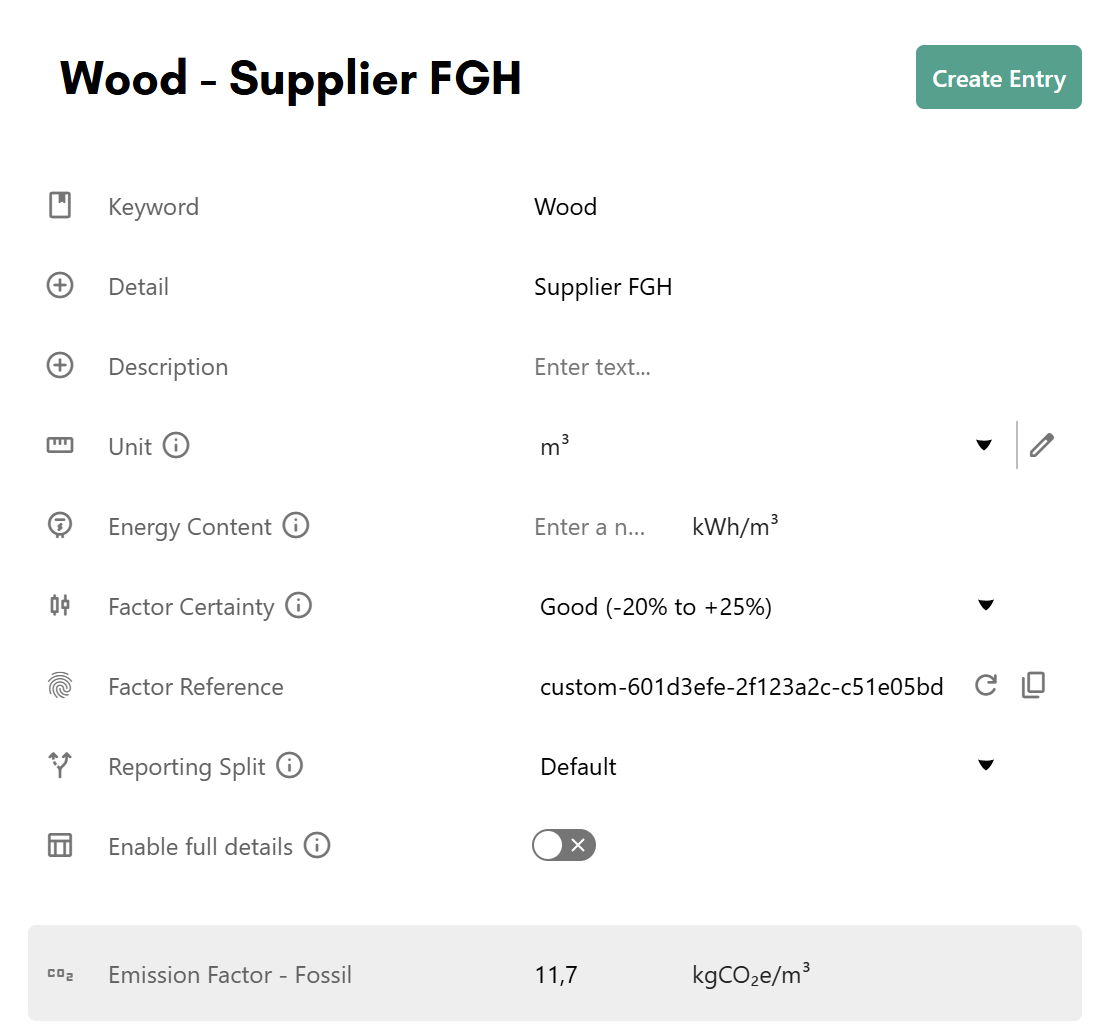
The factor value can be given as a single input or can include a full breakdown by greenhouse gasses, land data, and life cycle stages. If you have full details for an emission factor, switch "Enable full details" to on and a table of inputs will appear.
There is also the option to define an emission factor that has a reporting split with either market and location based reporting or with and without radiative forcing.
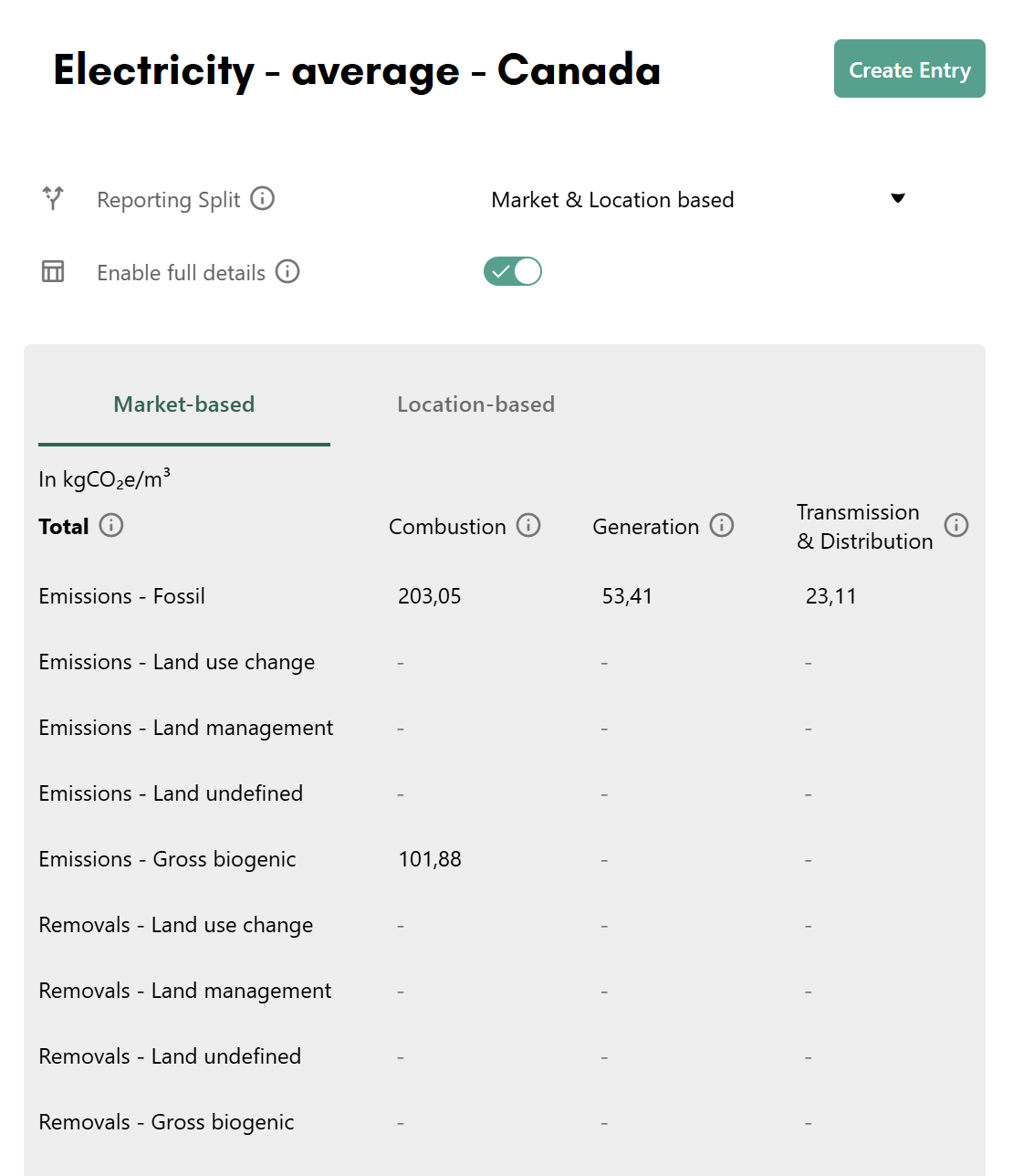
Full details breakdown
When full details are enabled, emission factors are broken down across three life cycle stages — Combustion, Generation, and Transmission & Distribution — and the following categories and gases. All values are entered in kgCO₂e per unit.
Total
Each subcategory total shows the sum of all greenhouse gases in the subcategory, excluding the gases under "Other". All factors are expressed as kgCO₂e/unit (see image above).
Notes on key fields
- Total kgCO₂e/unit — This is the sum of the breakdown values below it, excluding biogenic and "Other" values.
- CO₂e* — Use this field to enter total emissions where the individual GHG breakdown is not known. When switching between having a reporting split and no reporting split, this is the only value that will be preserved.
- Biogenic gases (BioCO₂, BioCH₄) — These represent emissions and removals from biological sources, tracked separately from fossil emissions in line with GHG Protocol guidance.
- Removals — Negative emission values representing carbon removed from the atmosphere, for example through land management or biogenic uptake.
Emissions — Fossil
Emissions from fossil fuel and industrial origins.
| Gas | Notes |
|---|---|
| CO₂ |
|
| CH₄ |
|
| N₂O |
|
| SF₆ |
|
| NF₃ |
|
| HFCs |
|
| PFCs |
|
| CO₂e* | Values expressed in CO₂e* represent greenhouse gas emissions for which a further breakdown in greenhouse gases is not known. |
| Other | Represents greenhouse gas emissions considered out-of-scope. Typically this includes fugitive emissions covered by the Montreal Protocol or other non-greenhouse gas climate forcers. This component does not add to the in-scope total. |
Emissions — Land use change
Emissions from converting one land type to another. Only the gases applicable in this category are shown.
| Gas |
|---|
| BioCO₂ |
| BioCH₄ |
| N₂O |
| CO₂e* |
Emissions — Land management
Emissions that are land-related but where the land type remains unchanged. Only the gases applicable in this category are shown.
| Gas |
|---|
| CO₂ |
| BioCO₂ |
| CH₄ |
| BioCH₄ |
| N₂O |
| CO₂e* |
Emissions — Land undefined
Emissions that are land-related but with uncertain further classification. Only the gases applicable in this category are shown.
| Gas |
|---|
| CO₂ |
| BioCO₂ |
| CH₄ |
| BioCH₄ |
| N₂O |
| CO₂e* |
Emissions — Gross biogenic
Carbon emissions from biological processes, accounted as a gross flux (flow accounting method).
| Gas |
|---|
| BioCO₂ |
Removals — Land use change
Carbon removals from land practices where one land type is converted to another. Enter removal values with a negative sign.
| Gas |
|---|
| BioCO₂ |
Removals — Land management
Carbon removals from land practices where the land type remains unchanged. Enter removal values with a negative sign.
| Gas |
|---|
| BioCO₂ |
Removals — Land undefined
Carbon removals from practices that are land-related but with uncertain further classification. Enter removal values with a negative sign.
| Gas |
|---|
| CO₂ |
| BioCO₂ |
| CO₂e* |
Removals — Gross biogenic
Carbon removals from biological processes, accounted as a gross flux (flow accounting method). Enter removal values with a negative sign.
| Gas |
|---|
| BioCO₂ |
Carbon+Alt+Delete standard factor units
Below is a full list of the standard factor units that can be selected when creating a custom emission factor, complete with conversion factors. Please note that while we support many different factor units, not all of these are available for selection in the Inventory. This is where conversion comes in.
Conversion example: Let's say a custom emission factor is created for distance with the value 1 kgCO2e/ft. When an activity is created in the inventory with this emission factor and the factor unit km, the conversion factor 0.0003048 is applied. So 1 km of that activity would yield 3 280.8399 kgCO2e.
| Category | Unit | Conversion factor | Selectable in Inventory |
|---|---|---|---|
| Currency (DKK) |
|
|
|
| Currency (DKK) | DKK | 1.0 | Yes |
| Currency (DKK) | kDKK | 1000.0 | Yes |
| Currency (DKK) | MDKK | 1000000.0 | Yes |
| Currency (EUR) |
|
|
|
| Currency (EUR) | EUR | 1.0 | Yes |
| Currency (EUR) | kEUR | 1000.0 | Yes |
| Currency (EUR) | MEUR | 1000000.0 | Yes |
| Currency (GBP) |
|
|
|
| Currency (GBP) | GBP | 1.0 | Yes |
| Currency (GBP) | kGBP | 1000.0 | Yes |
| Currency (GBP) | MGBP | 1000000.0 | Yes |
| Currency (USD) |
|
|
|
| Currency (USD) | USD | 1.0 | Yes |
| Currency (USD) | kUSD | 1000.0 | Yes |
| Currency (USD) | MUSD | 1000000.0 | Yes |
| Distance |
|
|
|
| Distance | m | 0.001 | No |
| Distance | ft | 0.0003048 | No |
| Distance | km | 1.0 | Yes |
| Distance | miles | 1.60934 | Yes |
| Distance | nmi | 1.852 | No |
| Distance-time |
|
|
|
| Distance-time | m*year | 0.001 | Yes |
| Distance-time | km*year | 1.0 | Yes |
| Energy |
|
|
|
| Energy | kWh | 1.0 | Yes |
| Energy | kJ | 0.000277778 | No |
| Energy | BTU | 0.000293071 | No |
| Energy | kcal | 0.00116222 | No |
| Energy | MJ | 0.277778 | Yes |
| Energy | GJ | 277.778 | Yes |
| Energy | MMBtu | 293.07107 | Yes |
| Energy | MWh | 1000.0 | Yes |
| Energy | toe | 11630.0 | No |
| Energy | GWh | 1000000.0 | No |
| Energy | TWh | 1000000000 | No |
| Energy | kWh lower heating value | 1.0 | No |
| Energy | kWh higher heating value | 1.0 | No |
| Hotel stays |
|
|
|
| Hotel stays | room per night | 1.0 | Yes |
| Number |
|
|
|
| Number | number of units | 1.0 | No |
| Number | units | 1.0 | Yes |
| Number | TEU | 1.0 | Yes |
| Number-distance |
|
|
|
| Number-distance | TEU.km | 1.0 | Yes |
| Number over time |
|
|
|
| Number over time | items per year | 1.0 | Yes |
| Passenger |
|
|
|
| Passenger | passenger | 1.0 | Yes |
| Passenger | vehicle | 1.0 | Yes |
| Passenger-distance |
|
|
|
| Passenger-distance | pass.km | 1.0 | Yes |
| Passenger-distance | pass.mi | 1.60934 | Yes |
| Surface |
|
|
|
| Surface | ft² | 0.09290304 | Yes |
| Surface | m² | 1.0 | Yes |
| Surface | ha | 10000.0 | No |
| Surface-time |
|
|
|
| Surface-time | m².year | 0.0001 | Yes |
| Surface-time | ha.year | 1.0 | Yes |
| Time |
|
|
|
| Time | minute | 0.0166667 | Yes |
| Time | hour | 1.0 | Yes |
| Time | day | 24.0 | Yes |
| Time | working day | 8.0 | Yes |
| Time | year | 365.0 | Yes |
| Time | working year | 225.0 | Yes |
| Vehicle-distance |
|
|
|
| Vehicle-distance | vehicle.km | 1.0 | Yes |
| Vehicle-distance | vehicle.mi | 1.60934 | Yes |
| Volume |
|
|
|
| Volume | litres | 1.0 | Yes |
| Volume | gallons (US) | 3.785411784 | Yes |
| Volume | gallons (UK) | 4.54609 | No |
| Volume | m³ | 1000.0 | Yes |
| Volume | ft³ | 28.316846592 | Yes |
| Volume | Mlitres | 1000000.0 | Yes |
| Volume-distance |
|
|
|
| Volume-distance | m³.km | 1.0 | Yes |
| Weight |
|
|
|
| Weight | mg | 0.000001 | No |
| Weight | g | 0.001 | No |
| Weight | kg | 1.0 | Yes |
| Weight | lb | 0.45359237 | Yes |
| Weight | tonnes | 1000.0 | Yes |
| Weight | Mg | 1000.0 | No |
| Weight | tons (UK) | 1016.05 | No |
| Weight | tons (US) | 907.185 | Yes |
| Weight | kt | 1000000.0 | Yes |
| Weight | Mt | 1000000000 | No |
| Weight | Gt | 1000000000000 | No |
| Weight-distance |
|
|
|
| Weight-distance | tonne.km | 1.0 | Yes |
| Weight-distance | kg.km | 0.001 | Yes |
| Weight-distance | lb.km | 0.00045359237 | Yes |
| Weight-distance | tonne.mi | 1.60934 | Yes |
| Weight-distance | kg.mi | 0.00160934 | Yes |
| Weight-distance | lb.mi | 0.00072998434473 | No |
| Weight-distance | tons(US).mi | 1.459972 | Yes |
| Weight-time |
|
|
|
| Weight-time | kg*day | 1.0 | Yes |
| Workload |
|
|
|
| Workload | person.month | 1.0 | Yes |
| Workload | FTE | 0.0833333 | Yes |