
Release notes October 2026
Custom Preferred Datasets; Bulk Emission Factor Matching; Consistent Energy Reporting
Use your custom datasets as preferred datasets
You can now select your own custom emission factor datasets as preferred datasets in your boundaries. This builds on the multi-select preferred datasets introduced earlier this year, so you can combine custom datasets with public ones, for example using your own waste factors alongside UK Gov or ADEME for fuels.
Preferred custom datasets are prioritised when selecting emission factors in Inventory, Import, and Requests.
(Note that you need to link your custom emission factors to a specific category. This is now a new field in the custom library. You can learn more about working with preferred datasets, including custom ones, in this article.)
Bulk matching of emission factors
You no longer have to search for emission factors one line at a time. Upload a whole list of items, such as a product catalogue or a procurement ledger, and the platform suggests a matching emission factor for every row. Use the suggestions as the starting point for new inventory lines.
- Use your own files. Upload any Excel table with one item per row. There’s no template to follow, and every column is used to find the best match.
- Match against your chosen sources. Pick the emission factor databases you want to use before you start.
- Review with confidence. Each row shows a confidence indicator and the reasoning behind the match, so you know which suggestions to check.
- Get results back fast. Download your original file with the matched factors added, or import it straight into your inventory using the factor reference.
For a full guide on how to use the new bulk matching feature, please refer to this article.
Full energy reporting
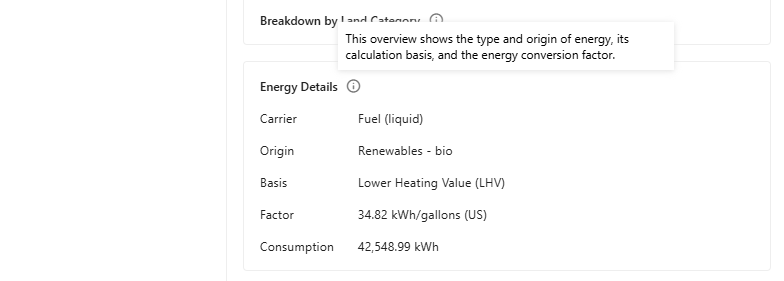
With this new feature, Carbon+Alt+Delete makes a transition from a pure carbon-accounting platform to also being an energy accounting platform. We have upgraded the level of energy metadata available and rolled out an update to apply to all emission factors in the inventory consistently. The following metadata is now available for the inventory table, detail pane, factor library and custom emission factors.
- Energy carrier: fuel (gas, solid, liquid), thermal, or electricity
- Energy origin: fossil (coal, gas, oil,..), renewable (bio, hydro, solar,…), and others
- Energy basis: higher or lower heating value (HHV/LHV)
This makes it easier to produce compliant energy figures for frameworks such as CSRD (ESRS E1), VSME, SECR and the CO2 Performance Ladder. Or you can use it for in-depth energy analysis in pivot table. The new fields are also included in the Inventory export (see Changes to Reports section further down).
Other updates & fixes
Updates
- Intercompany Trade now correctly considered in SECR reports
- Negative emission value warnings now available in Status Overview (need support page)
- New chapter added to Internal Reports: 6. Reporting Process and Improvement Plan
- When Simulation manipulations are added, additional information added to Notes
Fixes
- Attaching import files toggle re-added after isssue was introduced causing it to be missing
- Fixed an issue causing uncertainty table to end up out of screen on smaller screen sizes
- Fixed an issue with snapshots not loading correctly in the Insights view
- Sector code now correctly shows up in OpenCEDA emission factors in Factor Library
- Fixed scrolling issue in several views
- Many more small UX fixes and tweaks
Changes to Reports
Inventory export: new energy columns and updated column order
The Inventory export now includes three new columns, Energy Carrier, Energy Origin and Energy Basis, placed directly after Energy [kWh]. The GHG Protocol Reference and ISO 14064-1 Reference columns have also moved to sit before the energy columns.
| Column | Before | Now |
|---|---|---|
| AK | Energy Factor [kWh/unit] | GHG Protocol Reference |
| AL | Energy [kWh] | ISO 14064-1 Reference |
| AM | GHG Protocol Reference | Energy Factor [kWh/unit] |
| AN | ISO 14064-1 Reference | Energy [kWh] |
| AO | Company (Organizational Structure) | Energy Carrier (new) |
| AP | Level 1 (Organizational Structure) | Energy Origin (new) |
| AQ | Level 2 (Organizational Structure) | Energy Basis (new) |
The export now has 114 columns instead of 111. All columns from Company (Organizational Structure) onward keep their order but sit three positions further to the right (the last column moves from DG to DJ). No columns have been renamed or removed.
In the CONTENTS sheet, the energy fields are now grouped under the field type Details on energy consumption (previously "Summary data").
Action required: if you use templates, macros, Power Query or scripts that read the export by column letter or position, update them from column AK onward. References by column header name are not affected.